Stoqly app icon
iOS Inventory App
Stoqly

Inventory that actually makes sense

Stoqly is a smart, lightweight inventory management app built for small businesses — shops, cafes, restaurants, warehouses, and anyone who tracks stock.

🔍 Barcode Scanner ☁️ Cloud Sync 🤖 AI Assist 💰 Smart Sales 👥 Team Access 📊 Analytics 🔔 Low-Stock Alerts

See Stoqly in action

From dashboard to AI invoice import — everything your business needs, beautifully designed for iPhone.

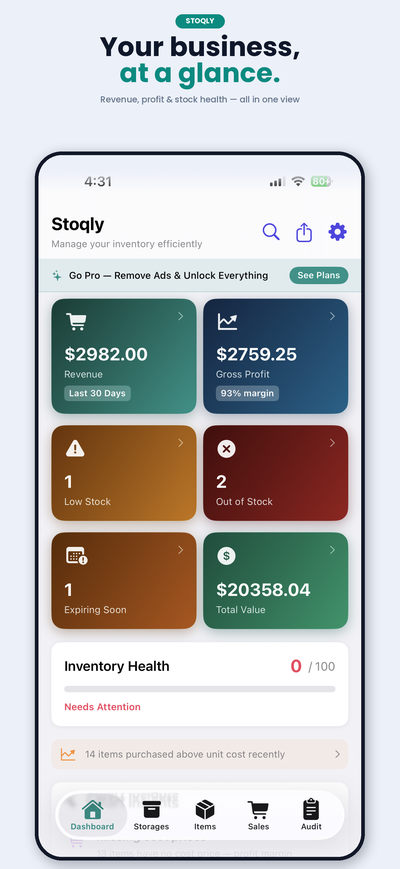
Stoqly Dashboard — revenue, profit and stock health at a glance
Your business,
at a glance.
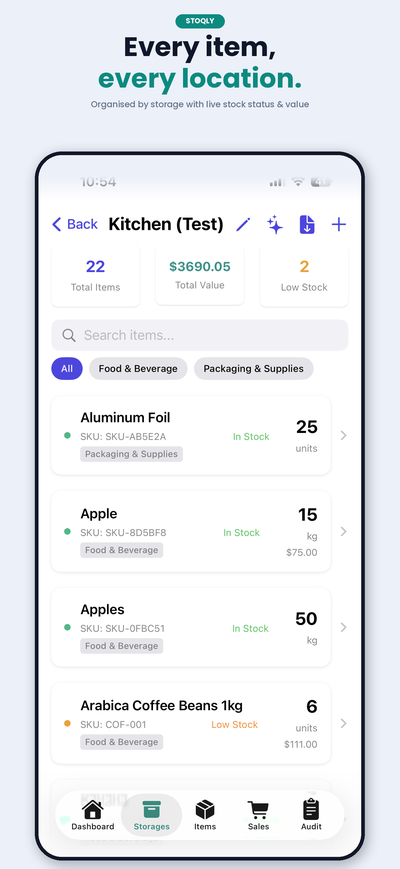
Stoqly Storage Areas — every item, every location
Every item,
every location.
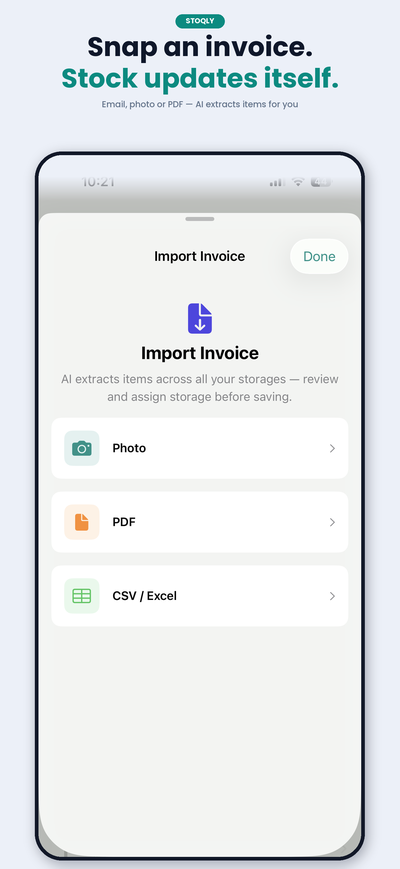
Stoqly Invoice Import — snap an invoice, stock updates itself
Snap an invoice.
Stock updates itself.
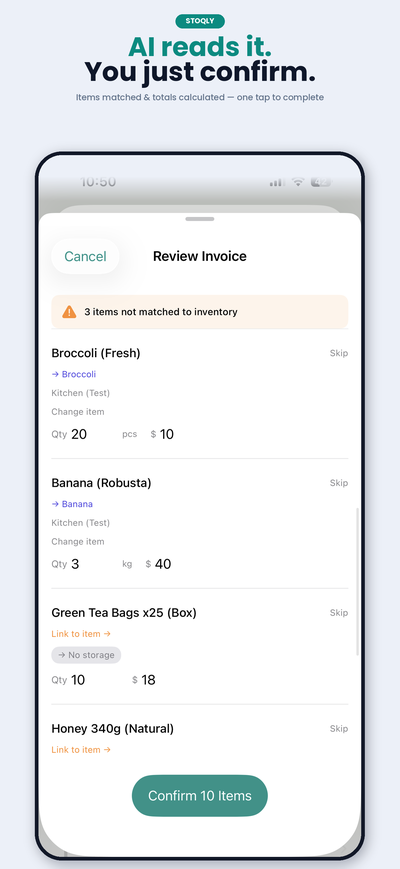
Stoqly AI Invoice Review — AI reads it, you just confirm
AI reads it.
You just confirm.
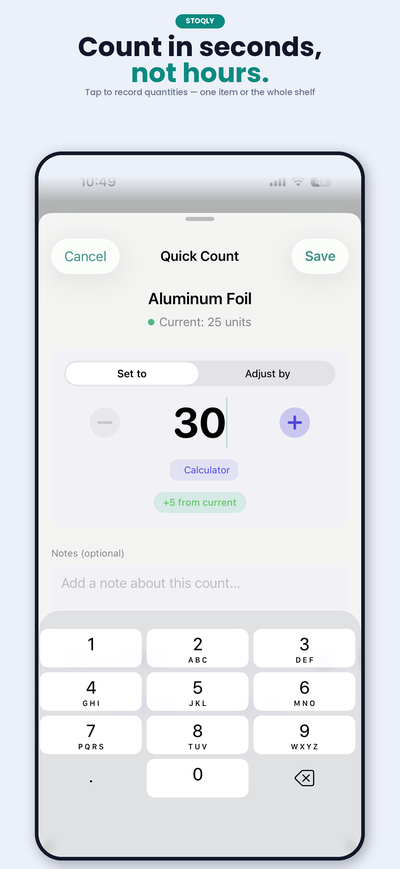
Stoqly Quick Count — count inventory in seconds
Count in seconds,
not hours.
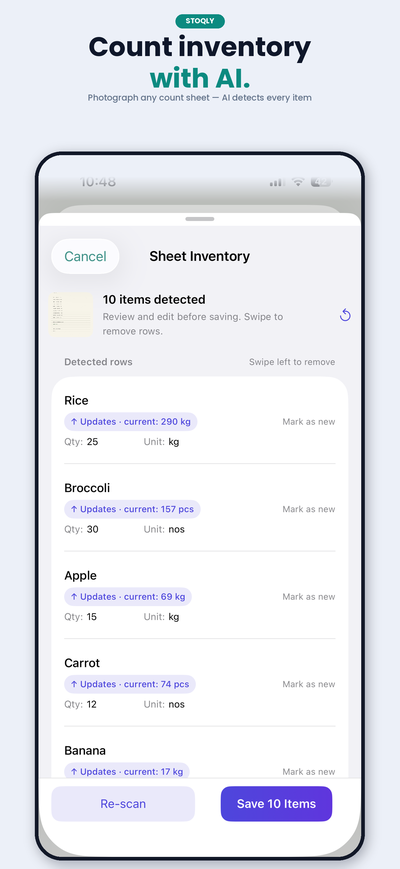
Stoqly Sheet Count — count inventory with AI
Count inventory
with AI.
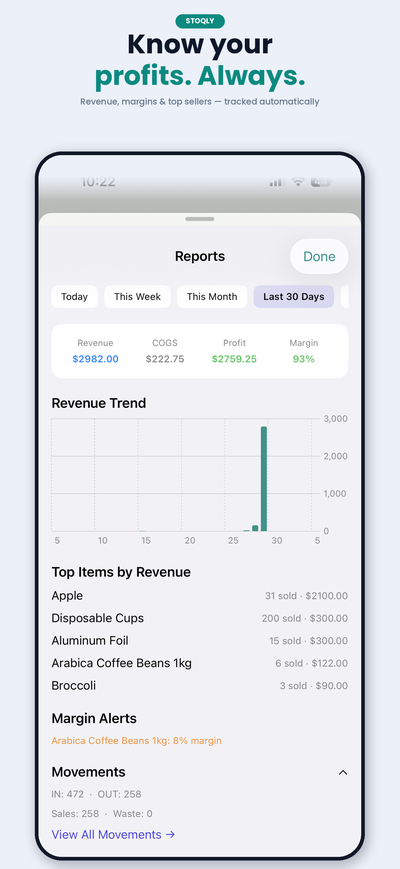
Stoqly Reports — know your profits, always
Know your
profits. Always.
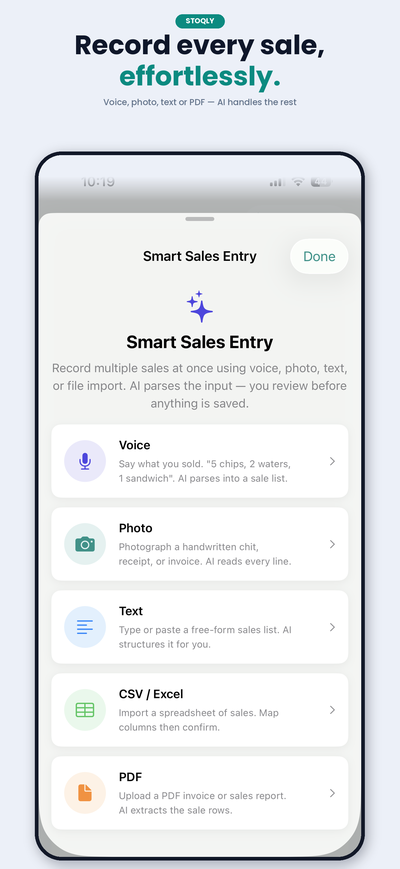
Stoqly Smart Sales — record every sale effortlessly
Record every sale,
effortlessly.

Built for real businesses

Whether you're running a café, a boutique, a grocery, or a warehouse — if you count stock, Stoqly was made for you.

Cafés & Restaurants
Track ingredients, consumables, and packaging
🛍️
Retail Shops
Manage SKUs, shelves, and reorder points
🏭
Warehouses
Multi-zone stock control with team access
💅
Salons & Studios
Track supplies and consumables between appointments
🔧
Repair & Service
Keep spare parts and tools accounted for
📦
Any SMB
If you track stock, Stoqly has you covered

Everything you need, nothing you don't

Stoqly keeps inventory simple. No bloated menus, no confusing setups — just the tools that matter for day-to-day stock management.

🏪

Storage Areas

Organise your inventory into named storage areas — shelves, fridges, storerooms, floor sections. Each area is independent and fully searchable.

  • Up to 5 areas on the free plan
  • Unlimited areas on Pro
  • Custom names, icons, and colours
  • Instant search across all areas
📋

Inventory Items

Add items with photos, barcodes, units of measure, categories, cost price, and reorder levels. Everything in one place, no spreadsheets needed.

  • Unlimited items on all plans
  • Custom units of measure (kg, litres, pcs, boxes…)
  • Cost and value tracking
  • Low-stock threshold per item
  • Batch and expiry date tracking
📷

Barcode Scanner

Scan any product barcode with your iPhone camera. Supported on all common symbologies — EAN, UPC, QR, Code128, ITF14, and more.

  • No external hardware needed
  • Manual entry fallback
  • Instant item lookup or creation
  • Scan to count, scan to find
📊

Dashboard & Analytics

See the health of your entire inventory at a glance — total value, low-stock items, recent activity, and trend insights.

  • Total inventory value
  • Low-stock and out-of-stock counts
  • Category breakdown
  • Activity feed with timestamps
  • Advanced charts on Pro
🔔

Low-Stock Alerts

Set a minimum quantity for any item and Stoqly will send a push notification the moment stock falls below it — so you never run out unexpectedly.

  • Per-item threshold settings
  • Push notifications via system
  • Alert summary on dashboard
  • Works in the background
☁️

Cloud Sync (Pro)

All your data syncs in real-time to the cloud via Firestore. Switch between devices instantly, and your inventory is always up to date — even offline.

  • Real-time sync across devices
  • Works offline, syncs on reconnect
  • Automatic backup
  • Secure — only your data, no sharing
👥

Team Collaboration (Pro)

Invite staff members to your workspace. Control who can view, edit, or manage inventory without sharing your account credentials.

  • Invite members via email
  • Role-based access (Owner / Member)
  • Members share the same live data
  • Activity log shows who did what
📥

Import & Export

Bring in existing data from a CSV or Excel file in minutes. Import purchase invoices directly from a PDF or photo. Export your full inventory as a clean CSV or a branded PDF report whenever you need it.

  • Bulk import from CSV / XLSX
  • Smart column mapping
  • AI-powered purchase invoice import (PDF / photo)
  • CSV export (free)
  • PDF report export (Pro)
🤖

AI Smart Sales

Record sales the way that suits you — snap a photo of a receipt, speak the items aloud, type a quick note, or upload a CSV or PDF. Stoqly's AI reads it and maps every item to your inventory automatically.

  • Photo, voice, text, CSV & PDF sales entry
  • Auto-maps items to existing inventory
  • Review and edit before confirming
  • Smart search across your inventory
🔢

Inventory Counting

Run stock counts directly in the app. Scan or tap items to record actual quantities, and let Stoqly flag any discrepancies instantly.

  • Count with or without scanner
  • Count history per item
  • Timestamps for every count
  • Adjustments logged to activity feed
🌍

Multi-Currency Support

Set your preferred currency and all cost, value, and reporting figures display accordingly — out of the box, no configuration needed.

  • Supports all major currencies
  • Consistent formatting throughout app
  • Change currency in Settings anytime
🔒

Privacy & Security

Your data belongs to you. Stoqly does not share inventory data with third parties, and all cloud data is secured under your account credentials.

  • Secure Firebase authentication
  • Data isolated per account
  • Optional ad tracking opt-out
  • Delete your account and data anytime
Up and running in minutes

No training needed. Most users have their first storage area and items set up within 5 minutes of opening the app.

1

Create an account

Sign up with email or Google. Your data is linked to your account and syncs automatically across your devices on Pro.

2

Add storage areas

Create areas that match your real-world layout — Main Shelf, Cold Room, Back Store. Give each a name and colour.

3

Add your items

Add items manually, scan barcodes, import from CSV, or let AI create them from a voice description or photo.

4

Track & manage

Update counts, get low-stock alerts, run reports, and invite your team. Stoqly keeps everything in sync automatically.

Simple, honest pricing

Start free for as long as you like. Upgrade to Pro when you need unlimited storages, cloud sync, and team features.

Free
$0
Forever free
Up to 5 storage areas
Unlimited items
Barcode scanner
Basic dashboard
CSV export
Low-stock alerts
Cloud sync
Team collaboration
PDF reports
Advanced analytics
Get Started Free
Most Popular
Pro
$4.99
per month · or $39.99/year (save 33%)
Unlimited storage areas
Unlimited items
Barcode scanner
Advanced analytics
CSV + PDF export
Cloud sync & backup
Team collaboration
AI reorder suggestions
Remove ads
Try Pro Free

All subscriptions managed via Apple. Cancel anytime from iPhone Settings → Apple ID → Subscriptions.

Full feature comparison

Feature Free Pro
Storage & Items
Storage areasUp to 5✓ Unlimited
Inventory items✓ Unlimited✓ Unlimited
Units of measure
Batch & expiry tracking
Custom categories
Scanning & Import
Barcode scanner
CSV bulk import
Excel (.xlsx) import
AI voice & photo add
Export & Reports
CSV export
PDF report export
Advanced analytics & charts
Sync & Collaboration
Cloud sync & backup✓ Real-time
Multi-device access
Team member invites
Role-based access
Activity log
Alerts & AI
Low-stock push notifications
AI reorder suggestions
Experience
Ad-free
Multi-currency

Common questions

Can't find your answer? Contact support →

Is Stoqly really free?
Yes — the free plan is genuinely free, with no time limit and no credit card required. You can manage up to 5 storage areas and unlimited items entirely for free. Ads are shown to keep the free tier sustainable. Upgrade to Pro to remove ads and unlock cloud sync, team access, and advanced reports.
What happens to my data if I cancel Pro?
Your data stays intact. You'll lose access to Pro-only features (cloud sync, team access, PDF export) but all your items and storages remain accessible on the free plan. If you have more than 5 storage areas, you can still view them — you just won't be able to add new ones until you're back below the limit.
Does it work offline?
Yes. All your inventory data is stored locally on your device, so Stoqly works fully without a network connection. On Pro, any changes you make offline are queued and automatically synced to the cloud the next time your device is online.
How do I invite team members?
On the Pro plan, go to the Storages tab → tap the team icon in the top right → Invite Member. Enter their email address, choose their role (Member or Owner), and they'll receive an invite. Once accepted, they'll see and update the same live inventory as you.
Can I import my existing stock list?
Yes. Stoqly supports bulk import from CSV and Excel (.xlsx) files. Go to any storage area → Import → choose your file → map the columns. The importer is flexible — it can handle different column orders and will skip duplicates automatically.
What barcode formats are supported?
Stoqly's scanner supports EAN-8, EAN-13, UPC-E, Code 39, Code 93, Code 128, ITF-14, Data Matrix, Aztec, PDF417, and QR codes. If scanning isn't available on your device, you can always enter barcodes manually.
How is my data secured?
Stoqly uses Firebase Authentication and Firestore with strict per-user security rules — your data is completely isolated from other users. We never share your inventory data with third parties. You can delete your account and all associated data at any time from Settings → Profile → Delete Account.
Is there a web or Android version?
Currently Stoqly is iOS only (iPhone). A web dashboard and Android version are on the roadmap. If you'd like to be notified when they launch, drop us a message.
How do subscriptions work?
Pro is a monthly ($4.99/month) or annual ($39.99/year) subscription managed entirely by Apple. You can cancel anytime through iPhone Settings → Apple ID → Subscriptions — no need to contact us. You keep access until the end of the billing period.
I have a problem or suggestion — how do I reach you?
Use the Support page or email us directly. We're a small indie team and aim to respond within 24–48 hours.
Stoqly

Ready to take control of your stock?

Download Stoqly free on iPhone. No credit card, no setup fee — just smarter inventory from day one.